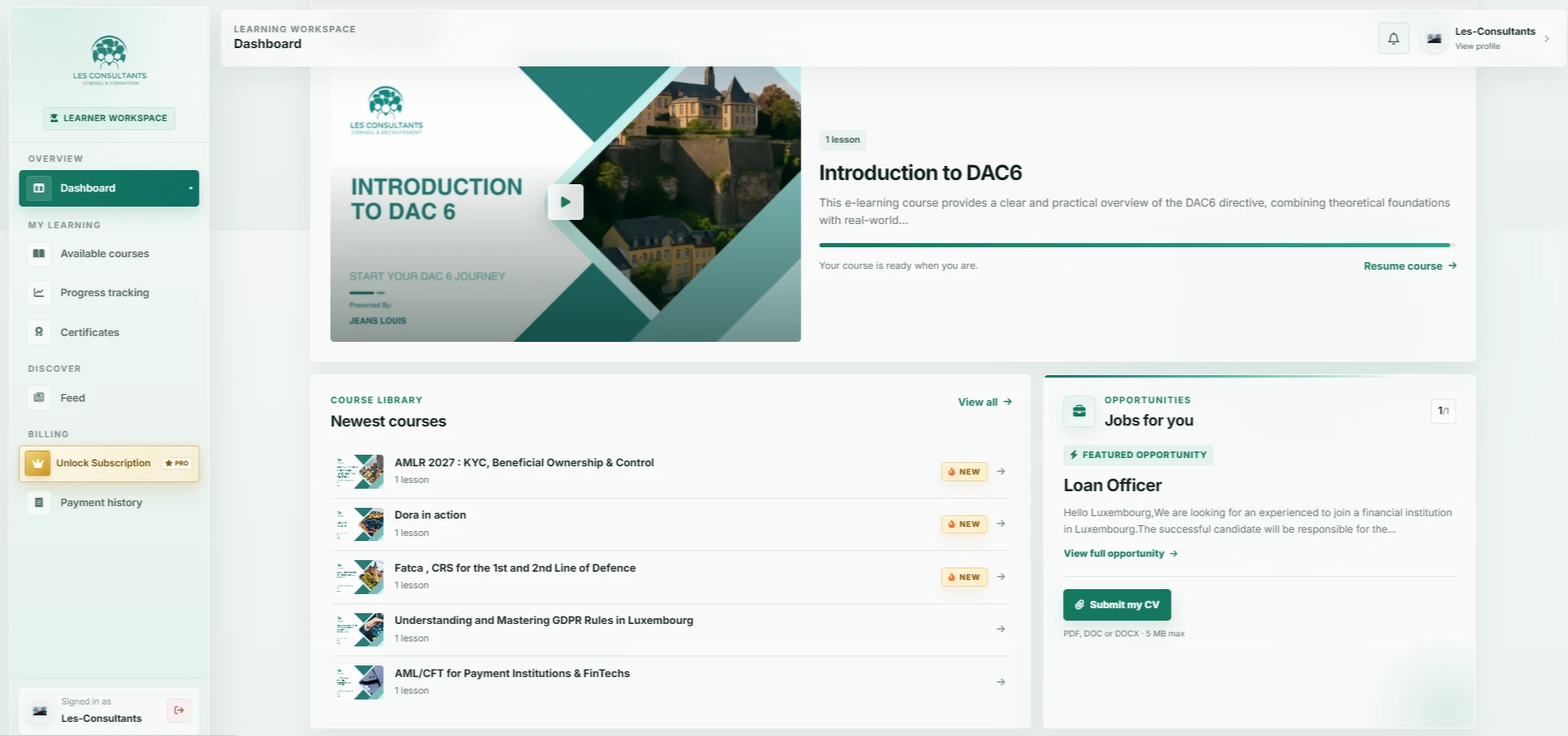

Describe a complete course from both the learner’s and administrator’s perspective. Access, progress, content and required integrations guide the platform choice and budget.
How do you define your learners’ journey?
Start with a representative course: learners discover the offer, receive access, study lessons and resume their progress. Specify what they need to know at each stage and who can help with difficulties. Test the same journey on a phone with an ordinary connection.
Then define progress rules. Watching a video, completing an activity and reaching a learning outcome are different events. Moodle’s documentation, for example, shows that course completion can depend on chosen criteria. Your project should define these before designing the indicators shown to learners.
- Enrolment conditions and access activation.
- Course structure, activities and resources.
- Progress or completion criteria.
- Available help and resuming a course.
What tools does the training team need?
The platform should support publishing a course, enrolling a group, correcting content and reviewing progress. Identify who performs each operation. Test administration with the person who will actually use it: a polished learner interface alone does not make daily management easy.
Specify which information trainers need and what learners may see. Decide who can amend an outcome, export reports or manage accounts. These rules should be documented and enforced in the tool. They also inform training and responsibilities after launch.
Should you choose an LMS or build a custom platform?
An existing LMS deserves consideration when its learning journeys and settings fit your organisation. Try the same course in shortlisted tools. Check accounts, content formats, export options and mobile experience before committing.
Custom development may be appropriate when training belongs to a specific business journey: company-based access, a specialised catalogue or connections to existing tools. Separate educational requirements from commercial processes in the brief. This helps keep the initial release focused. Our Symfony development service can assess this option against your business rules.
- Create, complete and update the same test course.
- Check access, roles and exports.
- Assess connections to existing tools.
- Compare launch spending and annual care.
How do you prepare a multilingual learning platform?
For training across several countries, prepare navigation, courses and support in the relevant languages. Translating only the menu leaves gaps in videos, documents or error messages. Have someone using the target language test the entire journey.
Video size, captions and readability also affect access. Define media hosting arrangements and test resuming after an interruption. For live sessions, clarify time zones and reminders. These requirements should be included in the brief.
How do you scope the budget and first release?
The budget includes the platform, courses, presentation, translations and ongoing care. Course numbers, concurrent access, media storage and integrations all affect the scope. Plan who updates content and how learners receive help after opening.
The Les-Consultants project presented by OptiWebSolutions illustrates an interface with courses, a library and progress tracking. For your platform, we can use a pilot course and your team’s requirements to scope features, design and development stages. This can be organised remotely with teams in France or internationally. See the Les-Consultants case study for a view of this learning workspace.