
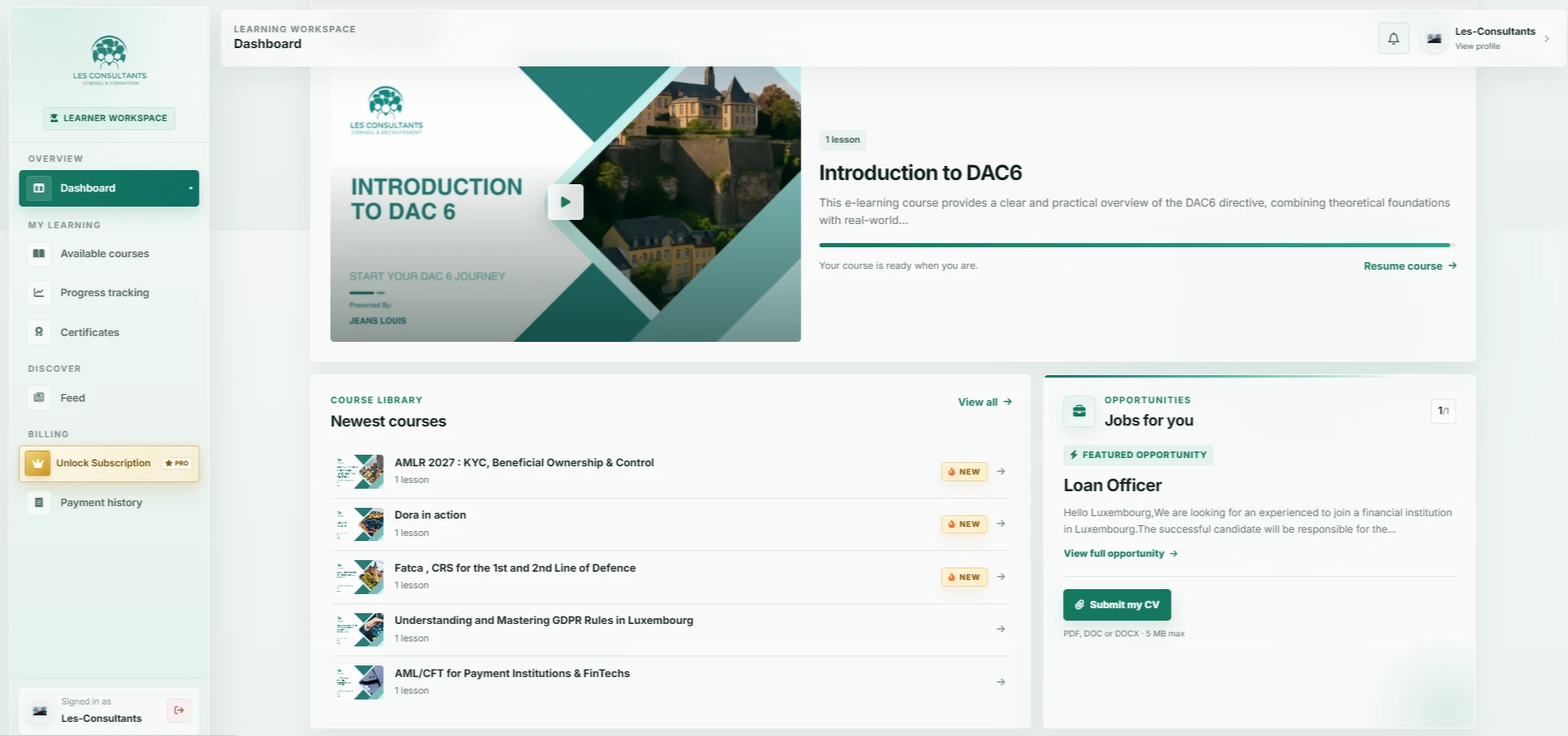
The interface gives one action clear priority: resume learning. Available content and progress remain nearby, helping learners stay oriented across the platform.
A dashboard built around the learner
A training platform needs to do more than list videos. It should help people find the right content, understand their progress and continue learning. Les-Consultants brings those reference points into the learner’s starting view.
The featured course occupies the first area of the dashboard. Its image, title and resume action identify a next step. The course library remains accessible below, allowing other subjects to be discovered within the same overview.
Organise features around the learning journey
The sidebar separates the main destinations: dashboard, available courses, progress and certificates. This creates consistent reference points. Labels describe where each link leads, and the active state identifies the current view.
Content blocks share a clear hierarchy: a heading, supporting information and an action. This lets the platform present learning content and complementary opportunities in one workspace while distinguishing their purpose.
- Place the course to resume before additional discovery content.
- Maintain recognisable navigation across views.
- Give actions labels that describe the next step.
What this project shows when planning e-learning
When planning a custom e-learning platform, we begin with journeys rather than module counts. Separate the learner’s tasks, the training team’s work and the information needed to follow activity. The dashboard can then provide a coherent starting point for those needs.
The project illustrates a design direction: accessible content and understandable progress. For your own platform, scoping should clarify course formats, access conditions, management roles and the approval steps required.