
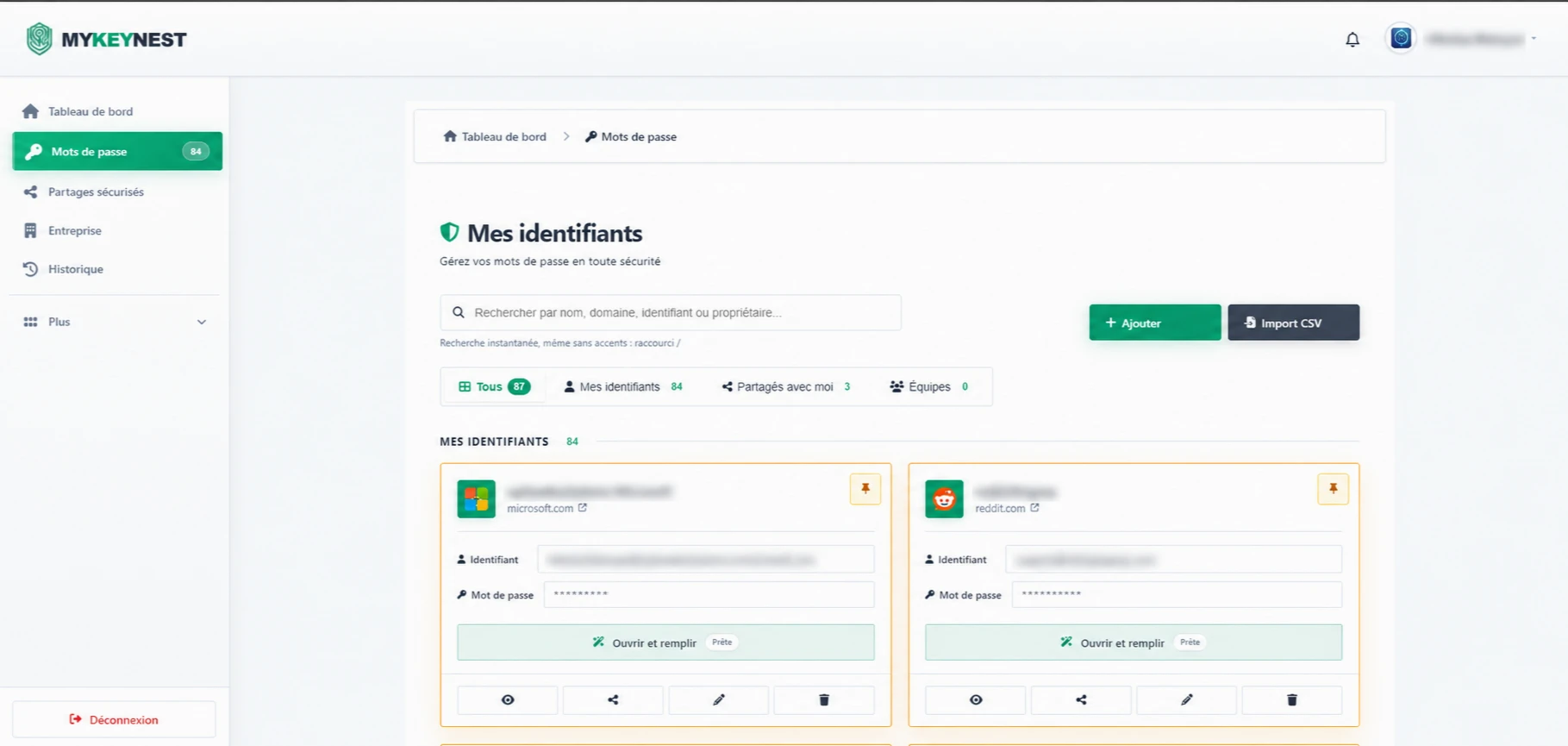
Finding sensitive information should be straightforward, while displaying and sharing it should remain intentional. The interface separates search, viewing and actions to make that journey understandable.
Make credentials easier to find
The credentials screen places search above the individual cards. Filters distinguish available, personal and shared entries, helping users narrow the list before viewing or using a credential.
Each card brings a service and its available actions together. Separate areas identify the entry, display its information and provide actions. Account details in the presentation screenshot were obscured before publication.
Give actions a clear context
An access management application needs particular care with labels and states. Finding an entry, displaying a secret, sharing access and deleting a card are different actions. Separating them visually helps users understand their intent before clicking.
Navigation also provides destinations for sharing, company settings and history. Scoping this kind of project involves connecting actions to the relevant roles. Technical security guarantees require documentation and implementation checks; a screenshot alone cannot establish them.
- Separate search, display and management actions.
- Distinguish personal credentials from shared access.
- Protect private information in presentation images.
Prepare a tool for your organisation
The project shows how a dedicated interface can organise a specific business need. Before developing a similar tool, define responsibilities, access levels, sharing use cases and data recovery arrangements.
These decisions guide the user journey and technical work alike. A useful first version should support essential actions with explicit permissions. Future improvements can then follow observed usage and your company’s requirements.